Apple AirPods are one of the most popular consumer electronics products worldwide, and unfortunately, this makes them a prime target for counterfeiters. A surge in fake AirPods flooding the market has raised serious concerns for consumers and retailers alike. These counterfeits are becoming increasingly sophisticated and harder to distinguish from authentic products. Here’s what you need to know to protect yourself from purchasing fake AirPods and ensure your investment is in genuine products.
Current Situation: A Growing Concern 📊
Counterfeit AirPods regularly appear in customs seizure announcements, including those published by U.S. Customs and Border Protection (source: CBP newsroom, cbp.gov). The latest generation of fakes is alarmingly high-quality, making it harder than ever to differentiate them from the real thing. Some of the methods counterfeiters are using to replicate AirPods include:
- W1/H1 Chip Functionality Clones: Counterfeit AirPods now mimic the functionality of Apple’s W1 and H1 chips, enabling fake versions to pair easily with Apple devices.
- Fake Serial Numbers: Many counterfeit products now have serial numbers that appear valid when checked, making it difficult for consumers to verify authenticity using Apple's official tools.
- Packaging Duplication: The packaging of counterfeit AirPods is almost indistinguishable from the original, using high-quality materials and printing.
How to Verify Authenticity 🧐
Ensuring the authenticity of your AirPods can be done through several verification methods:
1. Packaging Inspection: The First Step
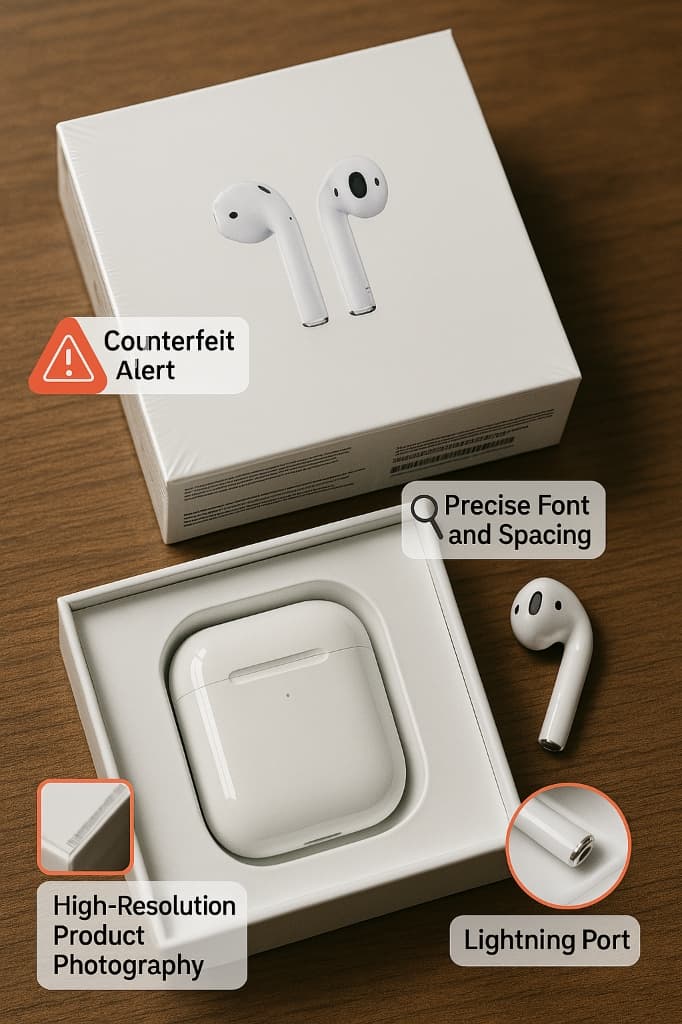
The packaging is often the first indicator of authenticity. Authentic AirPods come in carefully designed boxes with specific characteristics:
- High-Quality Printing: Apple uses premium-quality materials for packaging. The printing is sharp, and the font consistency is perfect across all text.
- Precise Font and Spacing: Every detail matters with Apple packaging. Look for consistent font usage, proper letter spacing, and alignment.
- High-Resolution Photography: Authentic Apple product photography is always high-resolution. Fake packaging might have pixelated images or blurry visuals.
2. Physical Verification: Examine the Details
Once you open the box, examine the actual AirPods and their charging case closely:
- Charging Case Construction: The charging case of authentic AirPods should feel solid, heavy, and well-made.
- Lightning Port Fit: Inspect the Lightning port on the charging case for proper alignment.
- Apple Logo and Markings: Look for a precisely placed Apple logo on both the AirPods and the charging case.
3. Functional Testing: Check the Features
One of the most reliable ways to verify your AirPods is by testing their functionality:
- Instant Pairing with iOS Devices: Authentic AirPods pair instantly with Apple devices once the lid is opened.
- Integration with iOS Settings: Genuine AirPods show up in the Bluetooth settings of your iPhone.
4. Serial Number Verification 🔑
Serial numbers are one of the most critical pieces of information when verifying authenticity. To check if your AirPods are genuine:
- Check on Apple’s Coverage Verification Website: Go to Apple's official website and enter the serial number found on the inside of the charging case lid.
- Match the Serial Number with Packaging: Make sure the serial number printed on the packaging matches the one inside the case.
Red Flags 🚩
It’s important to be aware of certain red flags that can indicate you might be dealing with counterfeit AirPods:
- Prices Significantly Below Retail: If you come across a deal that offers AirPods at a price far below the usual retail price, treat it as a red flag.
- Untrusted Sellers: Be cautious when purchasing from sellers with limited history or questionable reviews.
Protection Steps: How to Stay Safe 🛡️
To protect yourself from counterfeit AirPods, consider these helpful steps:
- Purchase from Authorized Retailers: Always buy from Apple’s official stores or authorized resellers.
- Register Your Product with Apple: Immediately register your AirPods with Apple to link them to your Apple ID.
What to Do If You’ve Purchased Counterfeit AirPods 🚨
If you suspect you’ve purchased counterfeit AirPods, don’t panic. Take the following steps:
- Contact Apple Support: Apple can assist you in verifying the authenticity of the product.
- Report the Seller: If you bought the AirPods from an unauthorized retailer, report them to the platform.