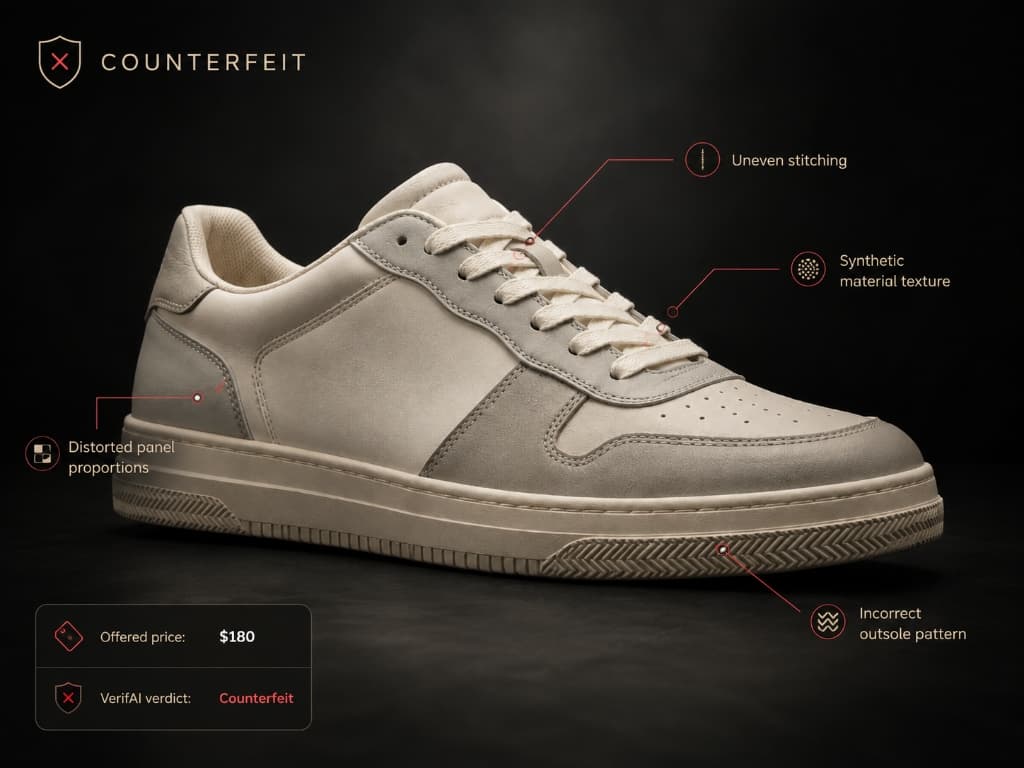
Put two or three items side by side.
Upload photos of up to three items, choose what matters to you and VerifAI scores each one, so you can see which comes out ahead and why.


How it works
Three steps.
Nothing to set up.
- STEP 01
Add the items
Item A is required; add B and C if you are choosing between several.
- STEP 02
Choose what to score
Pick tags such as quality or design, or let VerifAI use overall visual cues.
- STEP 03
See the result
Scores per tag for each item, a trend score and a clear winner.
What you get
What Compare gives you
beyond a yes or no.
Scores per tag
Each item scored on the qualities you chose.
A trend score
How current each item looks right now.
A clear winner
The item that comes out ahead, with the reasons.
One view
All items side by side, so differences are easy to spot.
Good for
When to use it.
- Choosing between two listings
- Checking an item against one you know is genuine
- Comparing condition across sellers
Worth knowing
What it is,
and what it isn't.
Compare scores what it can see in the photos. It is a comparison, not an authenticity verdict; run a check for that.
How a check worksMore from VerifAI
Other ways to check.
- Learn more
Quick check
A verdict and the key findings from a few photos
- Learn more
Deep check
A full report, a price estimate and a certificate to share
- Learn more
Listing check
Check a marketplace listing before you buy
Check it. Ask it. Buy it. Resell it.
Check your next item before you pay, or talk to us about a pilot for your team's review workflow.
Talk to us about a pilot